Caption:
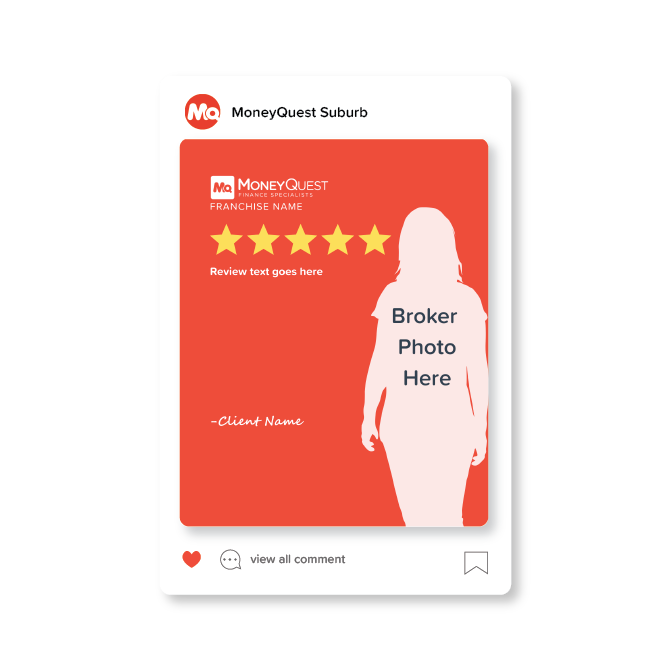
⭐⭐⭐⭐⭐
“[Client Review goes here in full]”
Another 5-star review from a happy client!
Do you need help with a loan? Reach out today!

Get these files by clicking the download links below:
Showcase your happy clients in style with this clean and modern Client Testimonial Canva Template. Simply customise the text and photos in Canva and start building trust with your audience in minutes.
Please note that you will need your own Canva account to access and edit the template.
How to Use the Client Testimonial Canva Template
Open the Template
Click the Canva template link, it will automatically open in your Canva account.
Make a Copy
Select “View Template” to create your own editable version.
Edit the Text
Replace the sample testimonial with your client’s feedback. Update the client name, title, or franchise name as needed. The client review should be a maximum of 50 words
Add Client Photo or Broker Photo
Delete the placeholder image and upload your client’s photo or broker photo to Canva and drag it into the image frame. (If you don’t have your broker photo available, please contact cases@mqga.com.au and we’ll send them to you).
Adjust Layout (Optional)
Move or resize elements if needed to better fit your content.
Download Your Design
Click Share → Download, then choose PNG format.
Share Your Testimonial
Post it on Instagram, Facebook, LinkedIn, or marketing materials to build credibility and trust with potential clients.
Caption:
⭐⭐⭐⭐⭐
“[Client Review goes here in full]”
Another 5-star review from a happy client!
Do you need help with a loan? Reach out today!
Get these files by clicking the download links below:
Buy Now
Get these files by clicking the download links below:
Buy Now
Get these files by clicking the download links below:
Buy Now
Get these files by clicking the download links below:
Buy Now


Reviews
There are no reviews yet.